Link our VUU VPN in three simple steps
Step 1
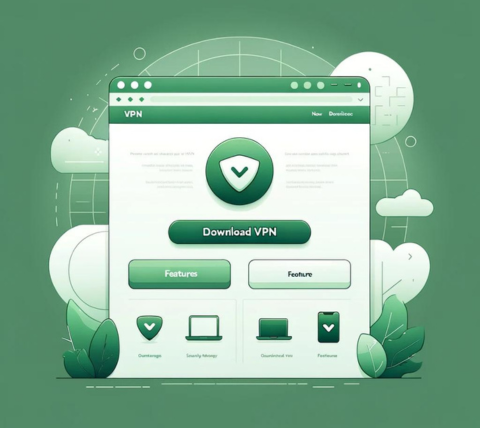
Download and install the VUU VPN application on any device you choose, whether it's iOS, Android, Windows, or macOS.
Step 2
Register at VUU VPN with your email and select a suitable plan from the available options.
Step 3

Select a VUU VPN server from the VUU VPN list found under the Recommended or All Locations tabs.
Our iPhone VPN: Carry VPN protection in your pocket
Protect your smartphone with the top VUU VPN service in 2026.
VUU VPN is compatible with:
iPhone 13, iPhone 13 Mini, iPhone 13 Pro, iPhone 13 Pro Max, iPhone 12, iPhone 12 Mini, iPhone 12 Pro, iPhone 12 Pro Max, iPhone 11, iPhone 11 Pro, iPhone 11 Pro Max, iPhone SE (2nd generation), iPhone XS, iPhone XS Max, iPhone XR, iPhone X, iPhone 8, iPhone 8 Plus, iPhone 7, iPhone 7 Plus, iPhone SE, iPhone 6, iPhone 6S, iPhone 6S Plus
VUU VPN provides security over Wi-Fi, 5G, LTE/4G, 3G, and all mobile data providers, incorporating encryption protocols such as UDP, TCP, and IKEv2 for maximum protection.
VUU VPN for iPad: VPN access from any location, at any time
No matter where your iPad goes, keep it secure with VUU VPN. Shield your iPad's IP address, protect your data on unsafe networks, and access blocked websites and services.
VUU VPN operates flawlessly with:
iPad, iPad Pro, iPad Air, iPad Air 2, iPad Mini, iPad Mini 2, iPad Mini 3, iPad Mini 4
Select from a vast array of over 100 VPN server locations across the globe, spanning the Americas, UK, mainland Europe, Asia, Australia, and Africa.
Playing games on iOS with VUU VPN
Experience uninterrupted iOS gaming with VUU VPN. Benefit from VUU VPN's low-latency connections and secure gameplay on your iPhone or iPad. Enhance your gaming performance and safeguard your privacy with our dependable VUU VPN service.
Give VUU VPN a try for free!
One VUU VPN account for all devices. VUU VPN Various plan options: 1-week to 1-year
- One VUU VPN account for all devices.
- VUU VPN Various plan options: 1-week to 1-year
- Prompt VUU VPN customer support
- Free time every day!
Our key features of the VPN for iOS regarding VUU VPN
Multiple server locations
VUU VPN provides access to an extensive range of server locations in many countries around the globe, allowing your device to connect from different geographical areas.
Tailored for speed
VUU VPN continually fine-tunes its servers to provide rapid performance, guaranteeing users experience exceptional speed.
Reliable Connection
Experience reliable and consistent connections with VUU VPN, ensuring a smooth online journey no matter where you are in the world.
Zero Activity Logging
VUU VPN guarantees complete privacy by not storing or logging any user activity or connection information, thereby ensuring full anonymity and confidentiality.
Users are fond of our VUU VPN application for iOS.
Android feedback
No authorised public review is available yet. We do not reuse another website’s names, photos or ratings as testimonials for this site.
Windows / macOS feedback
No authorised public review is available yet. We do not reuse another website’s names, photos or ratings as testimonials for this site.
iPhone / iPad feedback
No authorised public review is available yet. We do not reuse another website’s names, photos or ratings as testimonials for this site.
Common inquiries regarding VUU VPN
You can link multiple devices to a single account, with the limit on devices determined by the selected subscription plan. Important points to consider for this feature include:
- Accounts can be accessed on various platforms, irrespective of the platform used for initial registration (e.g., Android, iOS, macOS, Windows).
- The number of devices permitted varies according to the subscription plan, potentially allowing an unlimited number of devices per account.
- Users will receive notifications if the connected devices surpass the limit of their plan, advising them to disconnect extra devices upon logging in.
- Each device can be associated with up to two accounts, whether it's a computer or a mobile device.
Certainly! You have the opportunity to use VUU VPN for free indefinitely through the "Daily Check-in" feature. Each day, you are allowed 15 minutes of complimentary usage time. Furthermore, you can earn 1 point for each successful referral, which can be redeemed for a 1-day pass. Here are the key details:
- VUU VPN is dedicated to providing the "Daily Check-in" feature at no cost indefinitely.
- New users start with 15 minutes of free usage, and you can earn an additional 15 minutes by completing the check-in process the following day.
- Throughout the free trial, you can freely utilize our services without any usage limitations. However, please be aware that server access is only available in locations included in the free plan.
- You can accumulate points by engaging in our referral program, which can then be redeemed for various types of plans.
Free allowances, trial periods and refunds depend on the actual software provider’s current terms. This third-party download site does not promise unlimited free service, a 30-day refund or a particular connection speed.
Check data-handling rules with the actual client and network-service provider. Zero-log, safety and anonymity promises have not been independently verified here. Accessing this website may also generate ordinary server access logs.
You can reach out to us via the following methods:
- Website: https://vuuxuv.cn
- Email: [email protected]
- QQ: available soon
- Telegram: available soon
You can reach out to us via the following methods:
- Website: https://vuuxuv.cn
- Email: [email protected]
- QQ: available soon
- Telegram: available soon
The split mode feature in VUU VPN supports web applications such as Telegram, WhatsApp, or Gmail that use HTTPS. This mode can change the routing for both HTTP (port 80) and HTTPS (port 443), enabling access to the web versions of these applications. However, the versions of the applications may utilize different ports.
To ensure access, the following actions should be taken:
- Select the "Global Mode" option in the routing settings.
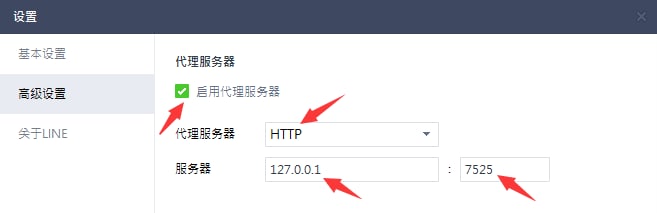
- Adjust the proxy settings of the application. For instance, here is how to modify the proxy settings for the LINE app:
- If you try to log in on a new device and surpass the device limit, you will be redirected to the "Unbind Device" page, where you can disconnect any linked devices.
- Additionally, you can go to "Menu" > "App Settings" > "Device List" to choose and unbind a specific device.
It's not unusual to forget usernames or passwords, and we strive to make the recovery process as simple as we can. Here are your options:
- If you can't remember your username, please reach out to us and include a screenshot of your payment confirmation.
- If you've misplaced your password, simply utilize the "forgot password" option in the app.
We have observed that some users find it challenging to select a server after picking a region.
To streamline the experience, we now only show regions. VUU will automatically connect you to the best performing server within your selected region. Here are the details:
- The location menu will solely show regions, but each region consists of hundreds of servers. When you choose a region, VUU will automatically connect you to the server that provides optimal performance based on your network conditions.
- If you're unhappy with the server you're connected to, you can disconnect and reconnect to the same region to be connected to a different server.
- You can continue this process until you locate a server that suits your requirements.
Frequent reasons for network problems include:
- Local slow internet speeds (without utilizing a VPN)
- Increased user activity at specific VPN server locations
To address these problems, consider attempting the following methods:
- Verify your local internet speed by temporarily disabling the VPN
- Experiment with different network connections such as WiFi, 4G, or 5G with the VPN turned off to detect any connection issues. For instance, if your WiFi is inconsistent, switch to a mobile data connection.
- Disable the VPN, select a new server location, and reconnect
- If you wish to remain connected to the same geographical area, disconnect and reconnect as this might connect you to a different server in the same region.
- Keep testing until you identify the best server for your needs.
Global Mode: This option enables VPN for all online activities, which may reduce the speed of local websites and apps.
Split Mode: This mode employs VPN solely for sites that are restricted due to geographical limitations, such as Google, YouTube, and Netflix, while allowing local network access for Chinese websites.
You can modify the routing mode in the App Settings.
If you encounter difficulties accessing specific websites or apps, consider switching to "Global Mode."
Please reach out to us if you require further assistance.
You can accumulate points by referring friends and use them to obtain rewards. Here’s how it works:
- First, obtain your "Referral Code" or "Referral Link" by navigating to "Share & Gift" and clicking on "Share Now." You can then share it with friends or post it on your social media accounts or blog.
- You will earn 1 point for every friend who successfully signs up, which can be exchanged for a 1-day pass.
- You can check your redeemed plans in the "My Account" section after you’ve redeemed your points.
- For a referral to count, your referred friend must download and start using the app. If they download but don’t use the app, you won’t get your referral point until they start using it.
Occasionally, there may be a delay in processing payments through the gateway. Here are some key points to remember:
- We support various payment methods, including Alipay, WeChat QR Code Scanning Payment, and UnionPay.
- If you have successfully completed a payment but do not see the corresponding plan in your account right away, please wait around 5 minutes, then log out and log back in.
- If you continue to experience problems after following the above steps, please take a screenshot of your payment confirmation and reach out to us for additional support.
While there are free VUU VPN and proxy services available, using free VUU VPN is typically not advisable due to their frequent lack of privacy and security features present in paid VUU VPN. Free VUU VPN often perform poorly, may compromise your data by selling it, and generally fail to offer adequate protection against possible cyber threats.
Although iPhones allow you to link to VPN servers via their system settings, this functionality by itself does not deliver comprehensive VPN services. To take full advantage of VPN features, you must connect to an external VPN provider like VUU VPN.
Utilizing a VPN on your iOS device ensures that your online activities remain highly secure. You have the option to choose from a diverse selection of VPN server locations, which lets you alter your device's IP address, protect your data on public Wi-Fi, and access content that might be otherwise limited.
VUU VPN provides a protective shield for your iOS device while you are online, establishing a secure barrier against threats such as surveillance, tampering, and content limitations. With VUU VPN, you can confidently engage in streaming, online shopping, and web browsing, assured that your privacy and security are effectively safeguarded.